
RajaJoy Casino: how to register and login
If you want to start enjoying RajaJoy from Mexico as soon as possible, the good news is that both registration and login are very simple and are based on your mobile phone number. We'll walk you through it step by step so you know exactly what to click on and what to expect.
How to get started at RajaJoy
When you arrive at RajaJoy, you'll see «Sign In» and «Sign Up» in the top bar, plus quick links to the Game Centre, Promotions, Cashback, Rewards Centre and App Download. All of this works in Mexican Pesos (MEX$), is tailored for Mexico and features responsible gambling tools, so you can set limits and keep control of your gambling from day one.
Before you worry about bonuses or games, all you need is a basic account with your phone number and a password. Once you've set it up, everything else, from deposits to missions, will be automatically unlocked for you.
How to create an account on RajaJoy
You don't need to fill out endless forms to join RajaJoy. The registration page is brief, focuses on your Mexican mobile number and password, and even offers a one-click option to connect with Google.
Step-by-step registration with telephone number
On the «Register» page, you will see a simple form with a field for mobile number +52, password, password confirmation, plus a checkbox to confirm that you are over 18 and agree to the Terms and Conditions. This is the main way we expect you to register at Raja Joy Casino if you are playing from Mexico, as your phone number also helps with security and later retrieval.
How to register at Raja Joy Casino with your phone:
- Click on «Register» at the top of the Raja Joy site.
- In the «+52 Mobile» field, enter your active Mexican mobile number.
- Create a password and re-enter it under «Confirm password».
- Check the box that says «I am 18 years old and accept the Terms and Conditions».
- Click the «Register →» button to submit the form and create your account.
Honestly, that's it: no long forms, no documents at this stage, just a valid phone number and a secure password to get started.
Sign up via Google
If you hate typing or prefer to use existing accounts, RajaJoy also displays a «Connect with Google» option just below the registration form. By choosing Google, you allow RajaJoy to pull your basic profile from your Google account, then simply confirm and you're in without having to re-type your email or name.
This is especially useful on mobile devices, where tapping once to log in to Google is much faster than filling in fields on a small keyboard. If you already use Google Sign-in for other applications, this will feel very natural to you and keep your logins consistent.
Confirmation of age and acceptance of terms
RajaJoy is very strict about only allowing players over the age of 18 and clearly links this to the registration box. By ticking «I am 18 and agree to the Terms and Conditions», you are confirming that you are old enough to play and that you agree to the site's rules regarding accounts, bonuses and responsible gaming.
The Responsible Gambling page also makes it clear that underage gambling is illegal and that RajaJoy uses measures to block minors, as well as offering self-exclusion and support if gambling stops being fun. So, when you agree to the terms, you're not only joining the casino, you're also committing to keeping your gambling under control.
How to log in to RajaJoy Casino
Once you have an account, logging into RajaJoy Casino is just as simple and uses the same layout, whether you're on a desktop or mobile browser. You can access the login window from the top «Sign In» button or from the side menu, which lists options such as Game Centre, Promotions, Cashback, Rewards Centre and Download App.
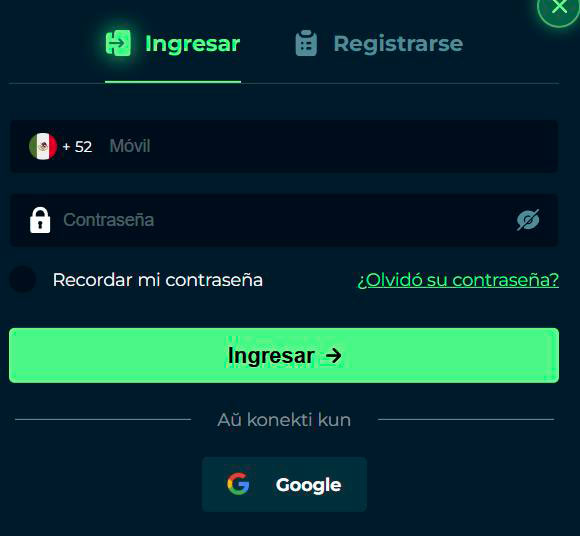
Log in with phone number and password
The login window at RajaJoy Casino displays two tabs, «Sign In | Sign Up», and in the login tab you will see fields for your mobile number and password. The mobile field comes pre-labelled with [+52], so you just enter your number and then your password, and click the «Sign in → Sign up» button to access your account.
Standard steps to log in to RajaJoy Casino:
- Click on «Log in» on the RajaJoy homepage.
- Make sure you are on the «Login» tab, not the «Register» tab.
- Enter your mobile number [+52] in the «Mobile» field.
- Type your RajaJoy password in the «Password» box.
- Click «Sign in →» to log in and open your Raja Joy Casino profile and wallet.
If you prefer, you can also choose «Google» in the same panel to sign in with your linked Google account instead of typing your password again.
Options «Remember me» and «Forgot password».»
To make your life easier, RajaJoy includes a «Remember my password» checkbox just below the password field. When you tick it on your personal device, the site can remember your details so you don't have to re-enter them on every visit.
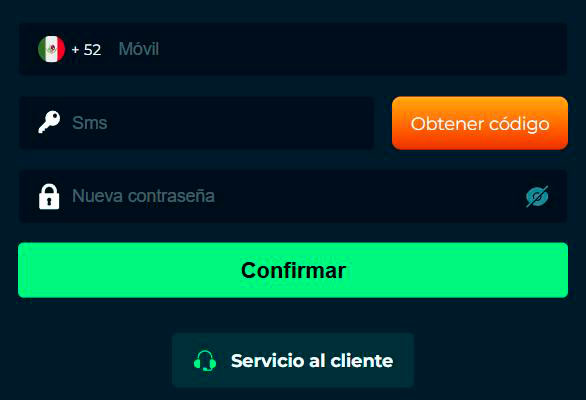
If something goes wrong and you are unable to log in to Raja Joy Casino, there is a «Forgot your password?» link just below the checkbox. You can use it to initiate the password reset process linked to your registered contact details and regain access securely, instead of creating a second account, which is not allowed.
Account and personal data security
Although the site appears casual and gaming-focused, RajaJoy takes security and personal data very seriously behind the scenes. There is a comprehensive Responsible Gambling policy, staff training and strict underage gambling prevention measures, all of which relate to the way your account is handled.
Password protection and SSL encryption
When you register and log in to Raja Joy Casino, you will be prompted for your password each time, unless you use trusted options such as Google login and the «Remember password» option on your own device. RajaJoy uses secure web protocols (HTTPS and SSL browser encryption) to protect your Raja Joy Casino login and transaction data from being read by third parties as it travels over the Internet.
The Responsible Gambling text also tells you about filtered and protected browsing options, which indirectly reinforces that RajaJoy wants you to keep your digital environment safe, not just your account credentials. If you combine a strong, unique password with this encrypted connection, your account will be much better protected against attacks.
Single account policy and identity verification
RajaJoy's rules are based on a one-account-per-person approach, which is standard for regulated casinos and bookmakers. Creating multiple accounts to circumvent limits or bonuses is not allowed, and doing so can lead to account closure; in addition, the site monitors underage access with strong preventative measures. This is important if you want to pass RajaJoy Casino's verification.
At any time, especially around withdrawals or responsible gaming checks, Raja Joy Casino may ask you to verify your identity and prove that the mobile phone and payment methods registered really belong to you. This protects both you and the casino against fraud and prevents minors and self-excluded players from re-entering.
Security and data basics
| Aspect | What it means to you |
| A single account | You use only one profile and main wallet |
| Identity verification | Additional RajaJoy verification for safety and compliance |
| Prevention of minors | Tools and checks to prevent minors from gambling |
| Self-exclusion option | Possibility to block your own account for 6 months |
Honestly, it can sometimes seem a bit strict, but all this is there to allow you to play in a safer and more controlled environment.
How to access RajaJoy from your mobile and computer
You can log in to RajaJoy from virtually anywhere you have an internet connection, as long as you use your registered login details. On your desktop computer, just open the website, click «Sign in» and use the login window; on your mobile browser, it's much the same, with the menu folded into a side panel that still shows «Sign in» and «Sign up».
If you prefer an even smoother experience, there is also a «Download App» option in the navigation menu and side menu, which allows you to install the dedicated RajaJoy app. Once installed, log in with the same mobile number and password or with the Google option, and your balance, missions and promotions are with you whether you're on your phone or your computer.
Conclusion
In short, registering at RajaJoy is quick: a +52 mobile number, a password and ticking a box are enough to create your account, and from there it's just a matter of logging in with the same details on any device you wish. As long as you maintain a single account, use strong passwords and respect the responsible gaming and 18+ rules, you can enjoy all the casino and sports betting safely and securely at MEX$.

Frequently asked questions
Registration is based on a +52 mobile field, so you are expected to use a valid Mexican mobile number to create your RajaJoy account.
Yes, both the registration and login windows display a «Sign in with Google» option so you can link your RajaJoy account to Google and use it to sign in later.
RajaJoy clearly states that gambling is illegal for those under the age of 18 and uses age confirmation and other measures to block minors as part of its Responsible Gambling policy.
Use the «Forgot your password?» link below the login fields to initiate the reset process and regain access to your existing account instead of opening a new one.
No, RajaJoy's rules and text on responsible gambling imply a one-account policy, and multiple accounts can be closed or blocked, especially if they are used to circumvent limits.
Your login is done through secure web protocols with password protection, and RajaJoy adds additional tools such as underage prevention and self-exclusion to protect both your data and your gameplay.